Skip to content
digital response
  • Home
  • Services
    • Agile Campaign Management
    • All services
  • Partners
    • Bloomreach Engagement
    • Braze
    • Klaviyo
    • Salesforce
    • All partners
  • Cases
  • Who we are
  • es_ES
Contact
Blog, Mobile Email

Responsive Email Design: Responsive Email Design and Layout Example

15 January 2014 alecastellano Comments Off on Responsive Email Design: Ejemplo de diseño y maquetación de un email responsive

Let's look at a case study to get a better understanding of how the media queries. In the design we saw before our newsletter, this would be the desktop version:
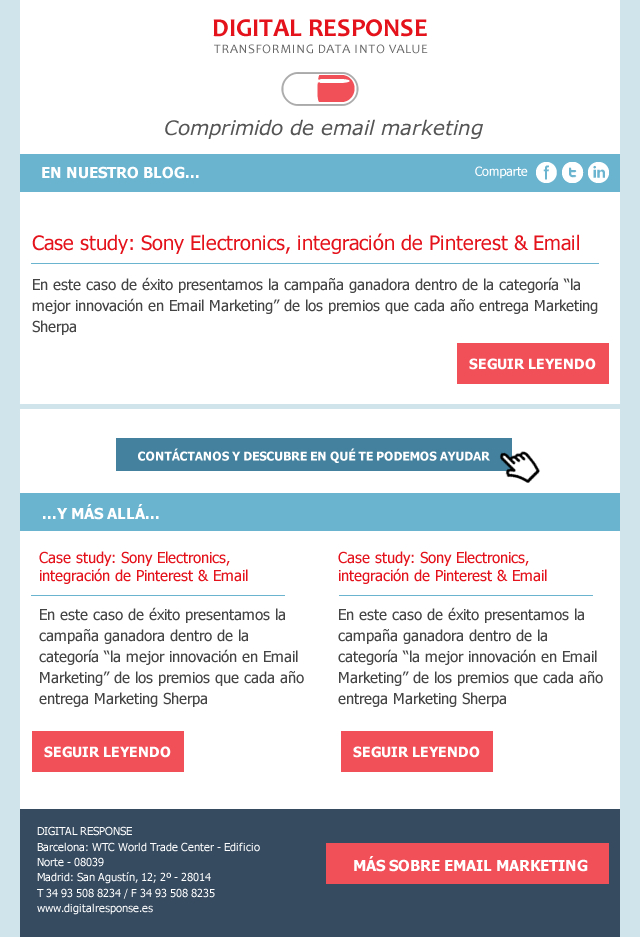
email-movil-responsive

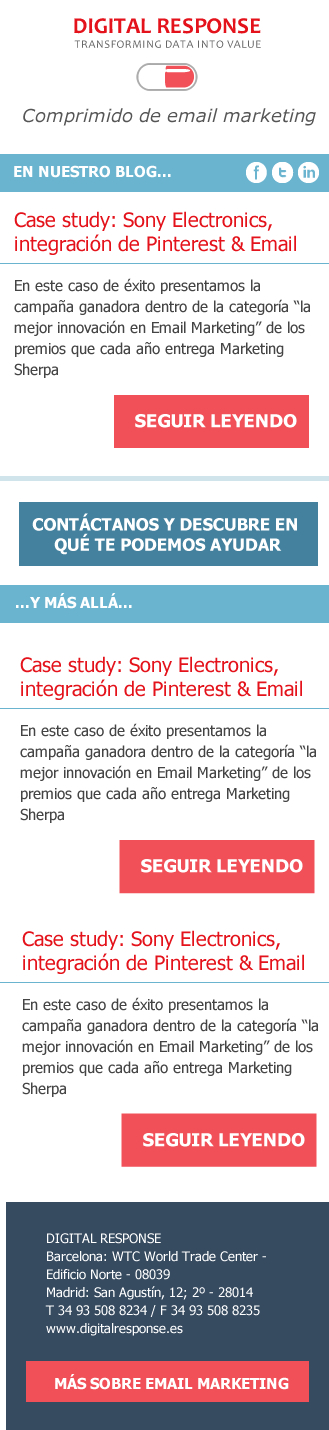
 And this is the mobile version:

email-movil-responsive-1

To layout this responsive emaile would play with percentages and average queries.
We would apply a percentage of 100% to the main table to make it adapt to any device and we would specify some details in the media queries. For example: we would enlarge the buttons in the mobile version to allow the user to click easily.
This would be the CSS which would correspond to the first part of the newsletter, where we declare the generic CSS rules and the specific ones for the mobile version so that the text adapts to the width and the button is bigger (be careful, Yahoo shows by default the mobile version of the Responsive layout unless we declare the classes with the attribute instead of with the usual CSS syntax):

<html xmlns="»http://www.w3.org/1999/xhtml»">

<head>
<meta http-equiv=»Content-Type» content=»text/html; charset=utf-8″ />
Responsive Email.
<style>
table[class=container] {width:600px}
table.share {width:100%;height:35px;font-family:Tahoma, Geneva, sans-serif;colour:white}
td[class=]{width:30%}
td[class=inourblog] {width:50%;text-align-right;font-weight:bold}
td[class=iconos] {width:20%}
div[class=text1] {margin-left:15px;margin-right:30px;font-family: Tahoma, Geneva, sans-serif;font-size:14px;}
div[class=btn]{color:white; font-family:Tahoma, Geneva, sans-serif;font-size:17px;background-color:#F15058;width:30%;padding:10px;margin-right:20px;text-align:centre;margin-top:10px;font-weight:bold}
@media only screen and (max-width: 480px) {
   table[class=container] {width:100%}
div[class=btn]{width:75%;padding:20px;margin-right:20px;text-align:centre;margin-top:10px;}
td[class=inourblog] {font-size:14px;width:50%}
td[class=share] {display:none}
td[class=iconos] {width:50%}    
 }

</head>

Responsive Layout
To create responsive structures that change according to the width of the device, the key is to nesting tables. For example, if we have a 2-column structure in an email with a width of 600px that must be adapted in the mobile version to a single column, we will use 2 tables of 300px.) In the desktop version they will be displayed next to each other, but if the available size is smaller, the second table will be placed below the first one, remaining in a single column.
In any case, we remember, as always, that the first step is to analyse the devices on which your audience is opening your email, as compatibility is still a conflicting aspect. Nowadays, a responsive email will only be profitable if our audience shows high open rates on Android and iOS devices, but not if they use the Gmail application, for example, because as we pointed out on other occasions, Gmail ignores the tag. If you want to know more about Responsive Design compatibility in Email we recommend you this article.


  • Responsive Email Design
alecastellano

Post navigation

Previous
Next

Search

Categories

Latest posts

  • Cómo Bimba y Lola transformó su CRM en el competitivo mundo del retail y la moda
  • Mide el impacto real de tus campañas de Marketing Automation
  • CRM Ágil y Marketing Automation en Moda y Retail

Related posts

Marketing Automation
Email Marketing Agency

Email marketing agency

19 May 2025 José Boix Comments Off on Agencia de email marketing

Email marketing agency in Barcelona In today's digital environment, connecting with users in a personalised way is key to the success of any strategy. In Barcelona, Digital Response is positioned as an email marketing agency specialising in effective and automated email campaigns. Why work with an expert agency in email marketing?

Blog, Mobile Email

Responsive Email Design: resources and materials from our webinar

20 May 2015 alecastellano Comments Off on Responsive Email Design: recursos y materiales de nuestro webinar

Last Wednesday we launched our first webinar. The theme of this first seminar was Responsive Email Design, a hot topic in the email marketing sector that many of you are still "afraid" of due to the lack of homogeneous interpretation by many email clients.

Blog, Email design

Yahoo fixes its problems with media queries

7 April 2015 alecastellano Comments Off on Yahoo soluciona sus problemas con las media queries

At the beginning of February, Fresh Inbox started a campaign to ask Yahoo to fix its incompatibility with the media queries we use to make our emails responsive.

digitalResponse_claim_500

We work with CRM teams looking to scale their programmes, operational excellence and improve results.

Agency
  • Services
  • Partners
  • Cases
  • Who we are
  • Work with us
  • Contact
Social
  • Facebook
  • Twitter
  • Linkedin
  • Youtube
  • Spotify

2025 © Digital Response, all rights reserved. Web by sararovira.com

  • Legal notice
  • Privacy policy
  • Cookies
Manage consent
To provide the best experiences, we use technologies such as cookies to store and/or access information on your device. Consenting to these technologies will allow us to process data such as browsing behaviour or unique identifiers on this site. Not consenting, or withdrawing consent, may adversely affect certain features and functions.
Functional Always active
The storage or technical access is strictly necessary for the legitimate purpose of enabling the use of a specific service explicitly requested by the subscriber or user, or for the sole purpose of carrying out the transmission of a communication over an electronic communications network.
Preferences
The technical storage or access is necessary for the legitimate purpose of storing unsolicited preferences of the subscriber or user.
Statistics
Technical storage or access that is used exclusively for statistical purposes. Storage or technical access which is used exclusively for anonymous statistical purposes. Without a request, voluntary compliance by your Internet service provider, or additional records from a third party, information stored or retrieved solely for this purpose cannot be used to identify you.
Marketing
Technical storage or access is necessary to create user profiles to send advertising, or to track the user across a website or across multiple websites for similar marketing purposes.
  • Manage options
  • Manage services
  • Manage {vendor_count} vendors
  • Read more about these purposes
See preferences
  • {title}
  • {title}
  • {title}