
What to do with the “impossible” demands of customers in email marketing
 Last week we started reading a thread in the Litmus community which turned out to be very familiar to us. These were demands from “unreasonable” clients. The impressions shared in this thread by email marketing professionals are very close to ours. These are some of the demands we hear from clients and why they cause problems or disagreements with the agencies that develop their emails:
– Make the link invisible when it is deactivated:
- The opt-out link is a key element in emails. Not only because it is legally mandatory to offer this option to the user, but because it is vital for the health of our metrics. Customers often confuse a good mailing list with an extensive mailing list and We have already discussed this on other occasions Because this isn't always the case. We need to let go of users who aren't interested in our communications, as they will eventually become inactive users who will only harm our metrics or even rank us as SPAM.
– Layout the texts in image format to maintain a consistent branding.
- The predominance of the image over the text can damage the deliverability and, in addition, many customers block the images, making many of the recipients never see the message. Our advice is always to text the main texts and CTAs, seeking a system font that provides the maximum consistency with the brand’s graphic identity. Sometimes, it is advisable to keep certain texts in image for branding purposes, but we must always seek the balance to achieve our goals.
– Support in Lotus Notes
- Lotus notes does not support most of the HTML/CSS standards used in email, and as it is a very minor client, it no longer makes sense to devote our efforts to how emails are displayed in this service. It is preferable to serve the majority of customers to be efficient.
– Responsive in Gmail
- Gmail does not interpret responsive design. It doesn’t matter how the client sets it up or how we set it up. Unfortunately, applying media queries to emails in Gmail is IMPOSSIBLE. Although, we can find a way to deal with this limitation. We can’t expect the result to be the same in Gmail as in clients that support responsive design, but with time, the developer can “hack”* the code enough so that the visualization in Gmail is at least correct, aesthetically acceptable, and usable. The best option is to take these limitations into account during the design phase to obtain a malleable structure that allows for adjustment across all clients.
– Remove the “view in your browser” link in the browser version.
- As its name suggests, the “Mirror Page” is a mirror of the email we send; therefore, if the email has a link to a version of the page other than the web version, this link appears in the mirror page as well. We cannot remove it. To prevent this link from appearing, we can only redirect to a page where we have hosted the email version without that link, rather than the mirror page generated by the delivery platform. The difficulty is that tracking interaction and personalization on this page require additional programming and we must ask ourselves, «Is the time and effort we are dedicating to implementing specific tracking and inserting custom parameters for the mirror page justified by the goal of removing a link?»
- UpdateSome email marketing tools they do allow you to remove this link, such as Cheetahmail, where we can make it invisible with the following code: %%IGNORE%% Mirror page link %%IGNORE%%,
– The email received is not an EXACT correspondence of the design we were starting from.
- Email clients do not interpret the code in the same way, therefore, in order for everyone to display it as similar as possible to the design, it takes time. Often, to fix a small detail, a lot of time has to be invested in researching and implementing the techniques to fix it, and this time and effort is often not justified. Even more so if these rectifications delay the moment of sending. The key is always in valuing the effort and dedication in relation to the results to be obtained and the initial objectives. In this regard, we would like to share some quotes from the Litmus forum: “Well-sent and well-delivered is better than perfect”// “Great for the majority, and imperfect but readable for the minority”// “We are dedicating X amount of time to the majority Y, at the expense of the majority Z”
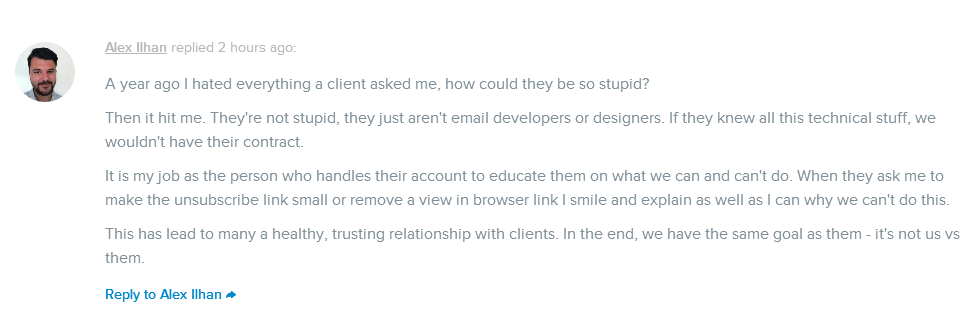
Customers have never developed an email and do not know the limitations they are subject to. Their demands, based on this ignorance, can be unrealistic or even counterproductive to their goals. As email marketing professionals, our job is to educate them. and make them understand that they are wrong when they ask for “a smaller low-resolution link” or “layout the entire email in image format”… We must be able to provide the arguments they need to understand that we are doing our best to optimize the efficiency and ROI of their emails, and that sometimes that means spending less time on minority email clients or layouting some text in “system fonts” by “breaking” their graphic standards. In the end, as Alex Ilhan says in this forum, We have the same goals as our customers; it’s not about Them VS Us.
What is your experience as developers or as customers when dealing with these demands and needs? Do the situations we discussed seem familiar to you?
*We are talking about «hacking» because email developers are looking for tricks to «trick» email clients and overcome some restrictions.
