
Responsive Email: 9 tips to apply to your campaigns
Currently the Responsive Email It has ceased to be an option and has become an obligation that email marketing must follow. You might ask yourself: "But is it really necessary to make such an effort? Will I see results?" The answer is a resounding YES. Let's look at a few figures:
At Study by Sign-up.to As we recently analyzed, we saw that almost half of the emails are opened from mobile devices. Specifically, we talked about a opening rate of the door 47.93%, a figure that has a historical tendency towards growth. But that's not all, there is also AB test What we did for TOUS, we also saw that the rate of Click to open It was a 16% mayor in the responsive version. Everything points to the need to adapt emails to any type of device to achieve a better user experience. In fact, it is a proven fact that the mobile device has almost become our shadow: it accompanies us everywhere, we can’t live without it and we use it as an instant reference tool. The high percentage of people who see an email on their mobile device first rather than on their computer is undeniable.
If you have already decided that you want to adapt email marketing to this new need, stay tuned to see these 9 tips to make a good responsive email for your campaigns.
- CHANGE THE CHIP
For those who are not yet convinced, but have decided to continue reading the post. We repeat and reiterate: Change the chip. Would you consider not having a responsive website? Surely not. In email marketing, the same thing happens exactly. If you care about your subscribers' experience and aim to improve the results of your campaigns, turn responsive email into your new best friend.
- SHORT AND ATTRACTIVE SUBJECT
This is a tip that should be applied to every email, but it becomes even more important when the email is being optimized for mobile devices. The subject matter should be brief and attractive. Keep in mind that it is the first thing that we see and that, therefore, it has to catch the attention of the subscriber. Make it so that with just one glance they already know what the email is about. As we have mentioned in Other occasions, It will be very interesting to personalize it and create the urgency to enter it.
- ASSIST HIM ON ALL SCREENS
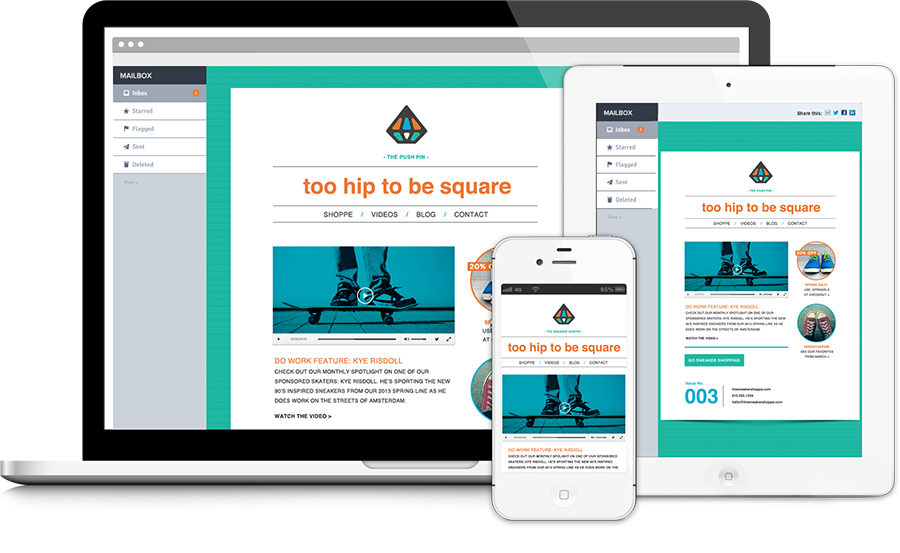
There are so many types of screens that it becomes difficult to know how responsive email design should be in order for it to look good on each of them. This is where the importance of adjust each of the elements From the email: check if it is necessary to adjust the font so that everything is readable, make sure the buttons are of a visible size and check that the images are not cropped.
- DESIGN
Pay attention to the elements that make up the design. Structure the text in a column to ensure that it looks good, since the width is very limited. The buttons should be large. Think that we are not talking about a tiny pointer, as we have in the case of the computer. The user will have to click with their finger and it has to be comfortable. If you don't want confusion when clicking on a link, leave it space between all the elements clickable.
- VISUAL CONTENT
Don't go overboard with the text. Highlight only those things that are most relevant and that you want to communicate. At that point, the fact that use keywords. Set the goal of creating a very responsive email intuitive and visual. For example: you can use bold to emphasize something that is important.
- LOOK MOBILE
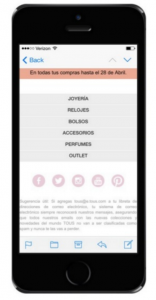

There is nothing better than applying those elements that are used in a responsive website to the responsive email. We are sure that they are well accepted by the users and that they will help us make our email more usable. In the following example we see how the typical drop-down menu that we are very used to seeing on the web is applied to a responsive email.
- USE PROXIMITY MARKETING
The proximity marketing It takes into account the Location the actual information of the potential customer, or in the case of email marketing, of the subscriber. Its main advantage is that it allows Segment the recipients based on their position And offer them different things. For example: You receive an email from a clothing store and it suggests which store is closest to you. Considering that we always have our mobile phone on us, this is an ideal strategy to implement in the responsive email.
- SIMPLE CONVERSION PROCESS
If you are interested in creating conversions, make sure you have a process that is Easy and understandable. For example: it always redirects the user to the mobile website or mobile app (if it has one) and creates a purchase form that has few fields and is quick to fill out. If you don’t do this, you risk losing a potential conversion.
- TESTING THE EMAIL
Always test the responsive email before you send it. If you have never done this before, there may be errors or things that need improvement. Don't let a failed campaign be the result of not doing a review. The option to create a A/B test to see the results of two different ideas and see which one performs better.
