
Email Marketing Videos
At one of the previous posts We explain how to add animation to your emails through GIF images. Today we’re going to take it a step further and explain how to add videos to your email campaigns.
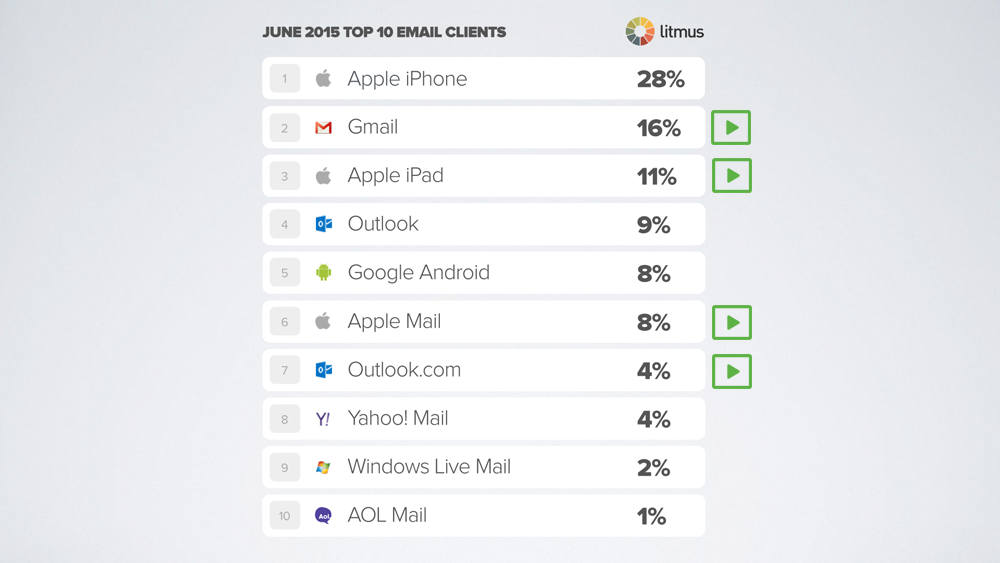
Obviously, video support today is not very widespread, however the customers that support it already account for almost 40% of the openings according to the latest statistics presented by Litmus:
The biggest disappointment is that starting with iOS 8.4, iPhones have problems playing videos in all email reading apps.That didn't happen with Steve Jobs ©)
The good news is that we can add a backup version for customers who do not support video. one of the previous posts We have already discussed how to do it.
Below we present a guide for implementing videos:
- Convert the video to the .mp4 and .ogg formats and upload them to a secure server.
- Upload the video to YouTube so that it can be played directly in Gmail.
- Code (more details at the end of the post):
- Teach the video version. Web and desktop clients that do not have video support should automatically display the backup version.
- Hide the video version for Android. Android doesn't show the backup version and tries to show the video, but it still doesn't turn out well.
- Previously, we taught the hidden video version for Android so that you could view it in Apple Mail and the iPad.
- And finally, hide the video version for iPhone.
Below you have the code that you can try in various clients to see how it looks in different clients.
See the Pen Videos in Email by Dimitri (@dimoooooooon) on CodePen.
